
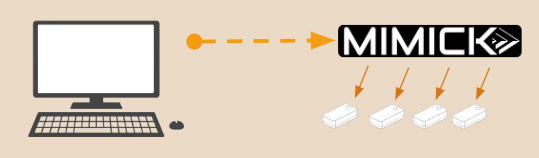
Hardware provisioning is repetitive, error-prone work. Load firmware, configure network settings, provision credentials, verify functionality. Multiply that by 50 units, 100 units, or thousands of units on a production line.
Manual provisioning doesn’t scale. Engineers end up babysitting devices through the same steps over and over. One typo, one missed step, and you’re debugging why unit #47 behaves differently than unit #46.
The Problem: Provisioning is Tedious and Error-Prone
Every hardware device needs configuration before it ships:
- Flash the correct firmware version
- Set device-specific parameters (MAC address, serial number, calibration data)
- Configure network settings
- Load security credentials
- Verify all interfaces work correctly
When you’re building prototypes, you do this manually. One device at a time. It’s tedious but manageable.
When you’re scaling to production, manual provisioning becomes a bottleneck. An engineer spends hours clicking through the same steps. If you’re provisioning 200 units, that’s days of work. If something goes wrong halfway through, you might not catch it until customer testing.
The real cost isn’t just time. It’s consistency. Manual processes introduce variation. Different engineers might configure things slightly differently. Settings get missed. Firmware versions get mixed up.
Contract manufacturers (CMs) need guaranteed processes. They can’t guess at configuration steps. They need reproducible procedures that work the same way every time.
What We Built
We built MIMICK to eliminate provisioning guesswork: profile-driven configuration that runs the same way every time.
Instead of manual steps, you define a provisioning profile once. Then you run it repeatedly with a single command.
Profile-Driven Configuration
A provisioning profile specifies exactly what should happen:
# production-v2.yaml
firmware: firmware-v2.3.bin
network:
  dhcp: enabled
  fallback_ip: 192.168.1.100
credentials:
  auth_cert: device-cert.pem
verification:
  - serial_output: "Boot OK"
  - network_ping: gateway
  - usb_enumerate: device_id
You define this once. Then provisioning becomes:
mimick provision --profile production-v2.yaml --device /dev/ttyUSB0The system handles everything: flashing firmware, configuring settings, verifying functionality. Same steps, same order, every time.
Command-Line Automation
All provisioning operations run from the command line:
# Flash firmware over USB-DFU
mimick usb flash firmware-v2.3.bin --device /dev/ttyUSB0

# Configure network settings
mimick network configure --dhcp enable --device /dev/ttyUSB0

# Verify serial output
mimick serial read --lines 50 --match "Boot OK"

# Full provisioning with verification
mimick provision --profile production-v2.yaml --verify --audit
Command-line tools integrate into scripts, CI/CD pipelines, and manufacturing workflows. You can automate the entire process.
Built-In Audit Trail
Every provisioning operation gets logged:
- Which profile was used
- What firmware version was flashed
- Verification results
- Timestamp and operator ID
If a device fails in the field, you can trace exactly how it was configured. No guessing about what happened during provisioning.
The First Win: 200 Units in One Day
We needed to provision 200 prototype units for customer evaluation. Previously, this would have been days of manual work: flash firmware, configure settings, verify each unit, document the results.
Instead, we wrote a provisioning profile and a simple shell script:
#!/bin/bash
for device in /dev/ttyUSB*; do
  mimick provision --profile customer-eval.yaml --device "$device" --verify
  if [ $? -eq 0 ]; then
    echo "✓ $device provisioned successfully"
  else
    echo "✗ $device failed, check logs"
  fi
done
We set up 8 test benches. Each bench handled 25 units. The script ran continuously: plug in device, run provisioning, verify, move to next device.
Total time: 6 hours for all 200 units. Human intervention: plug/unplug. Errors caught: 3 units with bad firmware images, flagged automatically.
Previously, this would have taken multiple engineers multiple days. With automation, one engineer monitored the process while the scripts did the work.
The Real Impact
- 150+ hours of manual provisioning work eliminated across prototype builds
- Zero configuration errors in production units (previously ~2-3% needed rework)
- Complete audit trail for every device provisioned
- CMs can run provisioning without engineering support—just execute the profile
- Firmware updates became trivial: update the profile, re-run provisioning
The time savings were significant. The consistency improvement was more valuable. Every device configured exactly the same way, with verification built in.
What We Learned
- Manual processes don’t scale: What works for 5 prototypes breaks at 50 production units
- Verification must be automated: If you’re not verifying automatically, you’re not verifying consistently
- Audit trails matter: Being able to trace device configuration saves hours of debugging
- CMs need reproducible processes: “Just follow these steps” doesn’t work at scale—they need executable automation
Your Turn
If you’re manually provisioning hardware, you know the pain: repetitive work, potential for errors, difficulty scaling to production volumes.
MIMICK provides:
- Profile-driven provisioning that runs the same way every time
- Command-line automation that integrates into your workflows
- Built-in verification to catch errors before devices ship
- Complete audit trail for traceability and debugging
- Scale from one bench to full production without changing processes
Stop clicking through provisioning steps. Start running verified profiles.
Learn more about MIMICK or contact us to discuss your provisioning challenges.